








A familiar room, an unfamiliar set of rules
Suzy Says is a first-person rules-based survival horror game built around a deceptively familiar situation: arriving home and discovering an interactive DVD alongside colorful floor mats. Those everyday objects provide the setting for instructions inspired by Simon Says. Instead of treating every command as an invitation to move immediately, you need to understand the condition attached to it. The tension comes from having to make that distinction while a horror presentation competes for your attention. This guide introduces that premise without pretending to provide a verified solution to every command or a guaranteed path through the hosted game.
For visitors arriving from Survive Min, the important difference is how you participate. Here the known controls involve movement, jumping and crouching rather than only selecting dialogue. Reading carefully still matters, but it has to be translated into a physical action inside a first-person space. Approach the first session as an opportunity to understand the relationship between instruction and response. You do not need advance knowledge of a hidden ending to begin, and there is no reason to treat a surprising early result as proof that you have permanently ruined your run.
Before pressing Play
The browser adaptation uses Construct 3 and has an approximately 256 MB initial load. That is substantial for a game embedded in a page, especially on a metered connection or an older device. Read the warnings and controls before starting the download. The cover is only the launch surface; seeing it does not mean the game resources have already arrived. After selecting Play, allow the embedded game time to initialize rather than pressing the launch control repeatedly or refreshing at the first blank moment. No exact loading time is promised because connection speed, device resources and caching vary.
This is horror content with flashing imagery, jump scares and unsettling themes. Decide whether that is appropriate for you before entering the player. Reducing volume may make sudden sounds less intrusive, but it does not remove flashing visuals or disturbing material. If these elements are a concern, skipping the game is a reasonable choice. The videos further down this page can also contain startling scenes and spoilers, so they are not a warning-free alternative. Keep a comfortable way to leave the session available and take a break whenever the experience stops being enjoyable.
Learn the controls without inventing extra commands
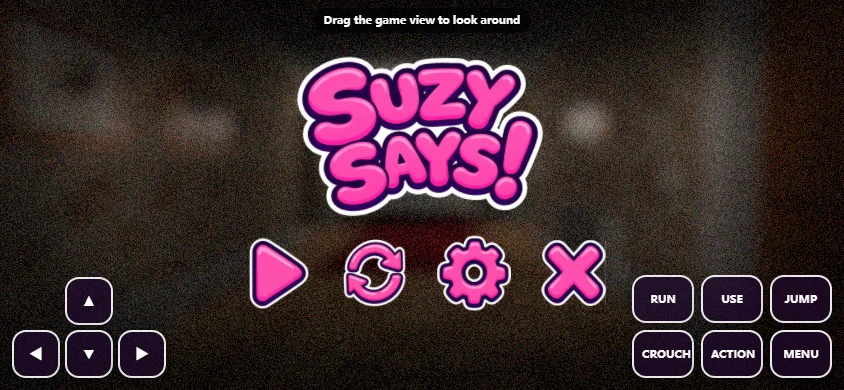
The supplied keyboard controls are WASD for movement, Space for jumping and C for crouching. These are the controls to prepare before attempting an instruction under pressure. Position your hand so that reaching Space or C does not make you lose track of the movement keys. A first-person view can make orientation feel unfamiliar, so use whatever safe introductory opportunity the game actually offers to understand your position. Do not assume a separate sprint key, a particular interaction button or a pause shortcut from another game; follow the information shown by this version instead.
If a key appears to affect the surrounding webpage rather than the game, click inside the embedded player and try again when the game is ready. Keyboard focus and loading are different problems, and neither necessarily means the command itself was wrong. Avoid testing several keys at once: an overlapping movement and jump makes it harder to understand which input produced the result. This recommendation is a learning method, not a claim about a required secret technique. Once you know that input reaches the player, return to the current instruction rather than repeating an older command from memory.
Separate the condition from the action
Simon Says-style instructions ask you to distinguish a valid command from an action that only sounds tempting. In Suzy Says, the useful habit is to identify the qualifying language before committing to movement. Read or listen to the complete instruction as it is presented, then decide what it asks and whether its condition applies. A familiar action word is not enough by itself. This page does not supply a universal phrase list or a timing window because those details have not been verified for the hosted adaptation. The instruction currently shown in the game takes priority over general advice.
Try describing the decision in two parts: the rule that makes the instruction actionable, and the movement needed to carry it out. Keeping those ideas separate can reduce impulsive reactions when the presentation becomes distracting. It also helps you review a failed attempt without blaming everything on reflexes. Perhaps you understood the action but missed the condition, or perhaps you understood the condition but pressed the wrong control. Those are different errors with different remedies. Neither requires assuming that the game changed its rules secretly, and neither establishes an unseen ending requirement.
Use the colored mats as observed information
The colorful floor mats are part of the premise, but this guide does not assign them invented safe colors, fixed sequences or hidden numerical values. Pay attention to what the current scene and instruction actually connect to them. When you are learning a space, noticing where a relevant object sits relative to your current viewpoint is more useful than memorizing a direction without context. A leftward movement from one position may not mean the same thing after you have turned or moved. Treat your present view as the reference rather than assuming a remembered route always applies.
If you want to keep notes, make them descriptive and small. Record the instruction you encountered, the action you attempted and the result you observed. Label uncertainty explicitly instead of turning a guess into a rule. For example, remembering that you were moving during a command is not the same as proving movement caused the outcome. This careful approach protects you from building an elaborate strategy on one ambiguous moment. It also makes a later comparison with footage more useful, because you can identify exactly which part of your observation remains unclear.
Make a second attempt informative
A repeat attempt is most useful when it answers a question. If you believe you misread a condition, focus on reading that condition next time. If you believe your input did not register, first check focus and controls. Changing your interpretation, route and input timing simultaneously may produce a different result, but it will not tell you which change mattered. Where the game allows a comparable attempt, adjust one thing and observe. This is practical experimentation rather than a walkthrough, and it cannot promise that every situation repeats identically or that progress is preserved between sessions.
Do not use a browser refresh as a casual undo action. Refreshing unloads the embedded game and may lose progress or trigger another resource load. Use the game's own menus or restart options when they are available and understandable, without assuming that an unverified save feature exists. The checklist on this page is deliberately separate: checking a preparation step does not communicate with the game or unlock anything. Its Reset button only clears your preparation marks. This distinction matters when you return later and want to know which information represents real in-game progress.
Browser loading and device expectations
A slow first load is plausible given the size of the adaptation, but a loading indicator alone cannot prove that everything is working. Allow time, check whether your connection is stable and avoid running unnecessary heavy tabs alongside the game. If the player never becomes usable, note the device, browser and visible symptom before trying again. A blank area, a stalled resource screen and keys not responding are different observations. There is no guaranteed fix listed here because we have not reproduced every failure mode. The page intentionally does not offer a separate top-level game link as a fallback.
Touch adaptation exists in the hosted version, but real-phone play has not been verified for this guide. A responsive outer page does not prove that every in-game control is comfortable on a small touchscreen, nor does it guarantee enough memory for a large first load. Keyboard play is the clearest documented control path. On a phone, consider connection cost, available screen space and whether the actual controls are readable before investing time in a run. Rotating a device can change available space, but it is not evidence of complete mobile compatibility or reliable completion.
Videos, spoilers and version boundaries
Two optional videos are provided below for viewers who prefer to see footage. They are references, not certification that every scene shown exists in this particular browser build. Watch after an initial attempt if you want to preserve the surprise of the presentation. If you are investigating a control problem, look for the relevant interaction rather than skipping straight to a final scene. A video can demonstrate what happened in a recorded session, but it cannot establish your current loading state, device support or whether a different version has exactly the same content.
Descriptions of the full release mention endless play and a hidden ending. Their availability in this hosted adaptation has not been confirmed, so this page does not promise either feature or label the player as a verified complete edition. It also avoids fabricated ending steps, secret codes and guaranteed completion times. The useful starting point is narrower and more honest: you can prepare for the known premise, understand the documented controls and approach the instructions carefully. If a feature is not visible in the version you load, do not assume that following an unsupported guide will make it appear.